


Deposit on U9play – Step-by-Step Guide for Secure Top-Ups
Why Deposit on U9play?
Depositing on U9play is designed to be fast, flexible, and secure. Whether you prefer online banking, QR payments, e-wallets, or crypto, you can choose a method that fits your habits. This page explains every step clearly so you can complete your deposit confidently and avoid common mistakes.
U9play Deposit Steps (Quick Overview)
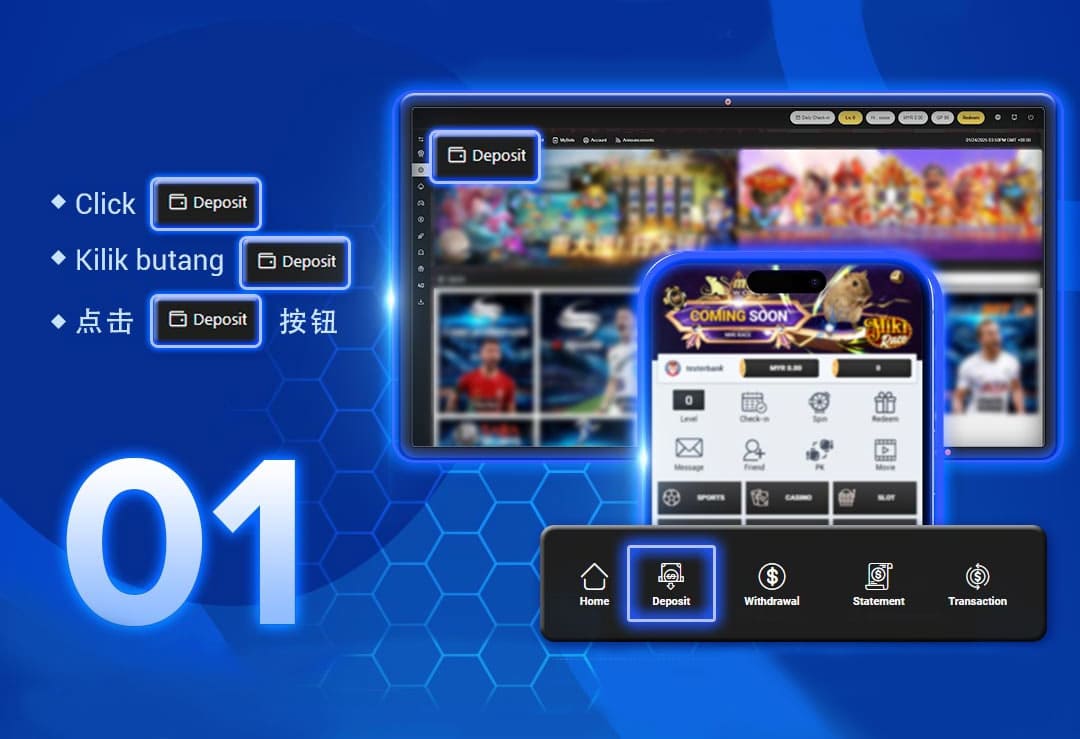
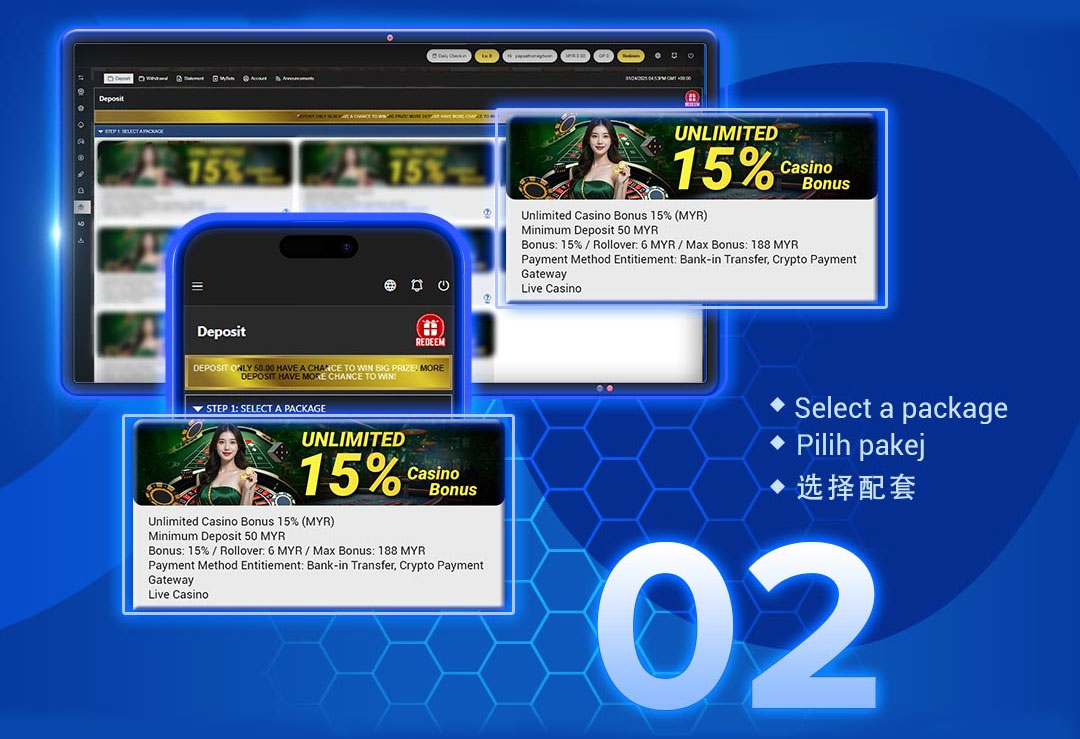
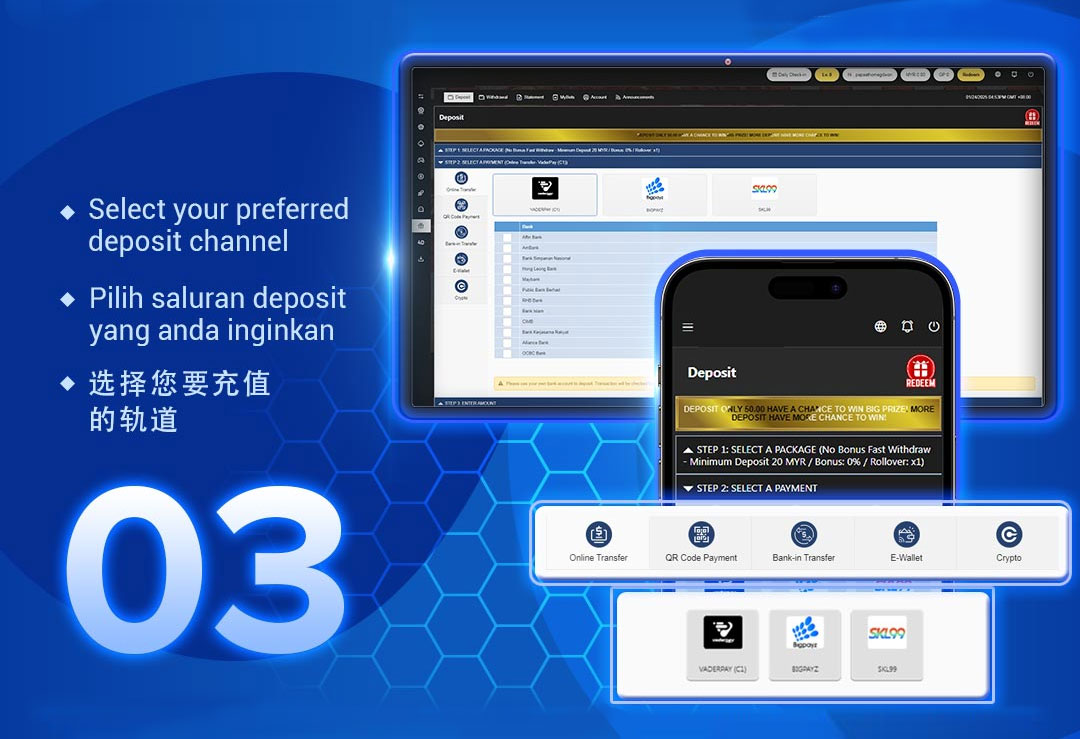
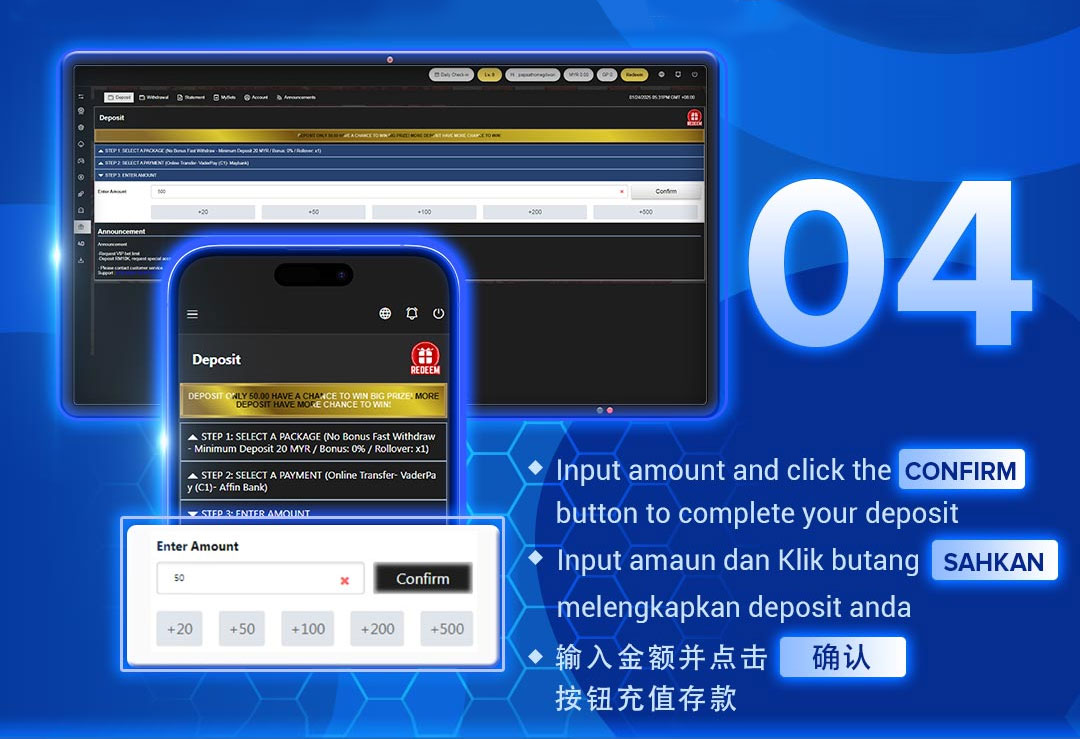
Step 1 – Click the "Deposit" Button
Open the U9play platform, locate the Deposit icon/button, and enter the deposit page. This is where you choose your package (if required) and select payment options.
Step 2 – Select a Deposit Package (If Available)
Some users may see packages such as bonus packages or normal deposits. Choose the deposit package that matches your goal (standard top-up, promotional top-up, or special package).
Step 3 – Choose Your Preferred Payment Method
U9play supports multiple deposit channels, including Online Transfer, QR Code Payment, Bank-in Transfer, E-Wallet, and Crypto. Pick the option that works best for your location and banking preferences.
Step 4 – Enter Amount & Confirm
Type the amount you want to deposit (or use quick buttons like +20, +50, +100, +200, +500). Double-check your method and amount, then click Confirm to complete your request.
Deposit Methods on U9play
U9play offers several deposit methods so members can top up quickly across different banks, wallets, and crypto networks. Below is a complete breakdown of each method and what it supports.
1) Online Transfer (Recommended for Most Users)
Online Transfer is ideal if you prefer to deposit directly via your bank account. It is commonly used for fast processing and supports many Malaysian banks through multiple gateways.
VaderPay (C1) – Supported Banks
Affin Bank, AmBank, Bank Simpanan Nasional, Hong Leong Bank, Public Bank Berhad, Maybank, RHB Bank, Bank Islam, CIMB, Bank Kerjasama Rakyat, Alliance Bank, OCBC Bank
VaderPay (C2) – Supported Banks
Hong Leong Bank, Public Bank Berhad, Maybank, RHB Bank, CIMB
BigPayz – Supported Banks
Affin Bank, AmBank, Bank Simpanan Nasional, Hong Leong Bank Berhad, Public Bank Berhad, RHB Bank Berhad
SKL99 – Supported Banks
RHB, PUBLIC_BANK, HLB, MAYBANK, BANK_ISLAM, BSN, AMBANK, CIMB
2) QR Code Payment (Fast Scan & Pay Option)
QR payments are best for users who want to scan and pay instantly without manual transfers. This method is convenient for mobile deposits and typically offers smooth confirmation.
QR Code Gateways Supported
VaderPay (C2), SKL99 (Touch'n Go, GrabPay, Boost, Shopee, DuitNow)
3) Bank-in Transfer (Manual Deposit Option)
Bank-in Transfer is suitable if you prefer traditional manual banking. You may be required to upload proof of transfer or follow additional verification steps depending on the system's requirements.
4) E-Wallet Deposit (Cashless Convenience)
If you frequently use e-wallets, you can deposit through supported e-wallet providers. This method is often faster than manual transfers and suitable for mobile users.
Supported E-Wallet Providers
A9WALLET, VADERPAY (DuitNow EWallet)
5) Crypto Deposit (USDT TRC20)
Crypto deposit is suitable for users who prefer digital assets and fast blockchain transfers. U9play currently supports USDT (TRC20), which is commonly used for lower network fees compared to other chains. Always confirm the network before sending to avoid loss of funds.
Important Deposit Notes for U9play Users
Package Change Policy
After selecting a package, if you wish to change to another package, you may need to complete the rolling target first (for bonus packages) or complete a credit deposit again. Always confirm your package before submitting payment.
Large Deposit Reminder (10,000+ MYR)
If you need to deposit 10,000 MYR or more, contact customer service to request a special bank account. This helps ensure large transactions are handled safely and correctly.
Use Your Own Bank Account
For smoother verification, deposit using your own bank account under your name. Using another person's bank account may cause delays or rejection depending on compliance checks.
Troubleshooting – Common Deposit Issues on U9play
Deposit Not Reflected Yet
Processing times can vary depending on the payment method. If you used bank transfer or manual bank-in, verification may take longer. For QR payments and e-wallets, ensure your transaction was completed successfully and try refreshing the page.
Selected Wrong Method or Amount
If you selected the wrong payment method or deposited the wrong amount, contact customer service quickly with your transaction details so they can advise the next steps.
Ready to Deposit on U9play?
Choose your preferred deposit method, confirm the amount, and top up safely in just a few steps. If you need assistance for large deposits or package changes, customer support is available to help.
Deposit Now – Malaysia Deposit Now – Singapore